Showing posts with label Oracle SOA. Show all posts

Saturday, December 12, 2015

Oracle SOA Interview Questions and Answers (Mediator)

Question: What is role of Mediator?

Answer: Oracle Mediator provides a lightweight framework to mediate between various components within a composite application. Oracle Mediator converts data to facilitate communication between different interfaces exposed by different components that are wired to build a SOA composite application.


Question:Difference between Mediator & OSB?

Answer: OSB is all together different tool which is used for integration like SOA but the main purpose of OSB is to route the information and same we can do with mediator. The main difference two is, we go for Mediator when we want to route information between different components inside composite and go for OSB when we want to route the information between composites. Mediator is used light weight mediation and OSB is used for heavy weight mediation.


Question: What is echo in Oracle Mediator?

Answer: The purpose of the echo option is to expose all the Oracle Mediator functionality as a callable service without having to route it to any other service. For example, you can call an Oracle Mediator to perform a transformation, a validation, or an assignment, and then echo the Oracle Mediator back to your application without routing it anywhere else.

For synchronous operations with a conditional filter, the echo option does not return a response to the caller when the filter condition is set to false. Instead, it returns a null response.

The echo option is available for asynchronous operations only if the Oracle Mediator interface has a callback operation. In this case, the echo is run on a separate thread.


Question: What is resequencing in Mediator ?

Answer: The resequencing feature of the Oracle Mediator reorders sets of messages that might arrive to the Oracle Mediator in the wrong sequence. You can define resequencing for all operations in an Oracle Mediator or for a specific operation.


Question: Resequencing options available in mediator?

Answer:

  • Standard (based on input Id)
  • FIFO(based on time)
  • Best Efforts


Question: What is Schematron Validation?

Answer: Schematron is an XML schema language, and it can be used to validate XML contents in an XML payload.


Question: Types of routing exist in Mediator?

Answer: Static & Dynamic Routing.


Question: What is Dynamic Routing in Mediator ?

Answer: A dynamic routing rule lets you externalize the routing logic to an Oracle Rules Dictionary, which in turn enables dynamic modification of the routing logic in a routing rule.

When you choose to create dynamic routing rule then it creates a new business rule service component that is wired to the Oracle Mediator service component within the SOA composite of the Oracle Mediator service component. The business rule service component includes a rule dictionary. The rule dictionary is a metadata container for the rule engine artifacts, such as fact types, rulesets, rules, decision tables and so on.

Inside routing rules, you need to set endpoint URI.


Question: Types of Static Routing rules?

Answer: Sequential & Parallel.


Question: Which static routing rule support fault policy ?

Answer: Parallel rules only.


Question: How many faults can Oracle Mediator service engine throw ?

Answer: Only One

{http://schemas.oracle.com/mediator/faults}mediatorFault.

Question: Difference between Sequential & Parallel static routing rules ?

Answer:

S.No: Sequential Parallel
1 Oracle Mediator evaluates routings and performs the resulting actions sequentially. Sequential routings are evaluated in the same thread and transaction as the caller Oracle Mediator queues and evaluates routings in parallel in different threads. The messages of each Oracle Mediator service component are retrieved in a weighted, round-robin fashion to ensure that all Oracle Mediator service components receive parallel processing cycles. This is true even if one or more Oracle Mediator service components produce a higher number of messages compared to other components. The weight used is the message priority set when designing an Oracle Mediator service component. Higher numbers of parallel processing cycles are allocated to the components that have higher message priority. You can set the Priority field in the Mediator Editor to indicate the priority of an Oracle Mediator service component. Priorities can range from zero to nine, with nine being the highest priority. The default priority is four.
2 Oracle Mediator always enlists itself into the global transaction propagated through the thread that is processing the incoming message. For example, if an inbound JCA adapter invokes an Oracle Mediator, the Oracle Mediator enlists itself with the transaction that the JCA adapter has initiated. Oracle Mediator initiates a new transaction for processing each parallel rule. The initiated transaction ends with an enqueue to the Oracle Mediator parallel message dehydration store. For example, if an Oracle Mediator service component has one parallel routing rule, one message is enqueued on the Oracle Mediator parallel message dehydration store. The parallel message dispatcher to the store then initiates a transaction, reads the message from the database store, and invokes the target component or service of this routing rule. The transaction initiated by the listener thread is a completely new transaction and is propagated to the target components.
3 Oracle Mediator propagates the transaction through the same thread as the target components while executing the sequential routing rules.
4 Oracle Mediator never commits or rolls back transactions propagated by external entities. Oracle Mediator commits or rolls back transactions because it is the initiator of these transactions. If an operation or event has both sequential and parallel routing rules, first sequential routing rules are evaluated and actions are performed, and then parallel routings are queued for parallel execution.
5 Oracle Mediator manages the transaction only if the thread-invoking Oracle Mediator does not already have an active transaction. For example, if Oracle Mediator is invoked from inbound SOAP services, Oracle Mediator starts a transaction and commits or rolls back the transaction depending on success and failure.


Friday, December 11, 2015

Oracle SOA Interview questions and answers

Part-1 : WSDL and XSD interview questions
Question : What is Web Service ?
Answer: Web service is a piece of code which is available on web (internet). That code of piece can be developed in any language (java, .net etc). A client invokes the web service by sending xml message and it wait for xml response (synchronously or asynchronously).

Question: What is WSDL ?
Answer : WSDL stands for Web Services Description Language
WSDL is a document written in XML. The document describes a Web service. It specifies the location of the service and the operations (or methods) the service exposes.

Question: Explain elements/tags of WSDL ?

  • Types : A container for abstract type definitions defined using XML Schema
  • message - A definition of an abstract message that may consist of multiple parts, each part may be of a different type
  • portType - An abstract set of operations supported by one or more endpoints (commonly known as an interface); operations are defined by an exchange of messages
  • binding - A concrete protocol and data format specification for a particular portType
  • service - A collection of related endpoints, where an endpoint is defined as a combination of a binding and an address (URI)


Question: Difference between Abstract and Concrete WSDL ?
Answer : Abstract WSDL contains only messages and operations. Abstract WSDL is used by SOAP Server.

Where as concrete WSDL contains messages, operations and transport specific information (JMS or Http). This is used by SOAP client.

Question : What is SOAP ?
Answer : SOAP is a simple XML-based protocol to let applications exchange information over HTTP. Or more simply: SOAP is a protocol for accessing a Web Service.

Question : What is XML Schema ?
Answer : An XML Schema describes the structure of an XML document.

Question : Difference between Include and Import in context to XML schema ?
Answer : The fundamental difference between include and import is that you must use import to refer to declarations or definitions that are in a different target namespace and you must use include to refer to declarations or definitions that are (or will be) in the same target namespace.

Question : What is targetNamespace's function?
Answer : <schema xmlns="http://www.w3.org/2001/SchemaXML         targetNamespace="http://www.example.com/name"         xmlns:target="http://www.example.com/name">
The targetNamespace declares a namespace for other xml and xsd documents to refer to this schema. The target prefix in this case refers to the same namespace and you would use it within this schema definition to reference other elements, attributes, types, etc. also defined in this same schema definition.


Part-2: XSL and Transaction interview questions


Question : How to refer another XSL from main XSL file ?

Answer : The <xsl:import> element is a top-level element that is used to import the contents of one style sheet into another.

Note: This element must appear as the first child node of <xsl:stylesheet> or <xsl:transform>. Syntax: <xsl:import href="URI"/>


Question: Why we use Call-template inside XSL ?

Answer : Call-template works similar to the apply-template element in XSLT. Both attach a template to specific XML data. This provides formatting instructions for the XML. The main difference between the two processes is the call function only works with a named template. You must establish a 'name' attribute for the template in order to call it up to format a document.

<?xml version="1.0"?>
<xsl:stylesheet version="1.0"
xmlns:xsl="http://www.w3.org/1999/XSL/Transform">
< xsl:call-template name="myTemplate">
< !-- Content: xsl -->
< /xsl:call-template>
< stylesheet>


Question: Difference between XA & Non-XA transaction ?

Answer: Non-XA (Local Transaction): It involves only one resource. When you use Non-XA transaction then you can’t involve multiple resources (different databases, Queues, application servers etc), you can rollback or commit transaction for only one resource. There is not transaction manager for this transaction as we are dealing with only one resource at a time.

XA (Global Transaction): It involves more than one resource (different databases, queues, application servers) all participate in one transaction. It uses two-phase commit to ensure that all resources either all commit or rollback any particular transaction. When you have scenario like you need to connect to two different databases, JMS Queue and application server, in this case you will use XA transaction that means all resource participate in one transaction only.


Question: What is inline schema ?

Answer: Inline schemas are XML schema definitions included inside XML instance documents. Like external schema documents, inline schemas can be used to validate that the instance matches the schema constraints.


Question: what is the use of Pick Activity?

Answer: This activity waits for the occurrence of one event in a set of events and performs the activity associated with that event. The occurrence of the events is often mutually exclusive (the process either receives an acceptance or rejection message, but not both). If multiple events occur, the selection of the activity to perform depends on which event occurred first. If the events occur nearly simultaneously, there is a race and the choice of activity to be performed is dependent on both timing and implementation.


Question: Design patterns in SOA ?

Question: Difference between Synchronous Process and Asynchronous Process ?

Question: Use of Config Plans ?

Friday, October 30, 2015

DB Adapter Singleton behaviour in High Availability Environment

We faced a problem in high availability environment (clustered).

We had one Integration between Oracle Ebiz and third party system in which we get the data from Oracle Ebiz and send it to third party application. This integration was running fine till the time our server environment upgraded for high availability means clustered ones...

We had two clusters which were configured to be synchronous to idealize HA situation. But this causes a design issue.

The issue started in our DB Adapter. Cluster1 and Cluster2 starts initiating DB Adapter instances which polling the Staging Table(OEBS) in parallel. If the clusters increased in future from 2 to 10 then 10 instances of pooling components will be created and will hit the third party application in parallel. This could be a problem for the target system if it doesn't supports parallel processing.

The solution to this problem is Singleton property in our pooling component / DB Adapter.

To enable this feature in high availability environment for a given inbound adapter endpoint, one must add the singleton JCA service binding property in the element within the composite.xml and set it to true as shown below:

Singleton Property in composite.xml

I hope this will help.


MDS-01330: unable to load MDS

MDS-01330: unable to load MDS configuration document

After successful installation of SOA(11g) 11.1.1.5 on Oracle XE when I started the managed server I faced following exception which makes me worried.... and kept on thinking for few minutes ....do I need to reinstall everything but thanks God I got a solution.
I hope this helps to all who faced such an issue.

Exception

oracle.mds.lcm.exception.MDSLCMException: MDS-01330: unable to load MDS configuration document
MDS-01329: unable to load element "persistence-config"
MDS-01370: MetadataStore configuration for metadata-store-usage "soa-infra-store" is invalid.
ORA-04063: package body "DEV_MDS.MDS_INTERNAL_SHREDDED" has errors
ORA-06508: PL/SQL: could not find program unit being called: "DEV_MDS.MDS_INTERNAL_SHREDDED"
ORA-06512: at line 1.....


Solution

  1. First of all drop SOA Suite schemas and associated tablespaces using RUC.
  2. Then go to command line (cmd) and set environment variable RCU_JDBC_TRIM_BLOCKS=TRUE
  3. Run RCU again to re-create the SOA Suite schemas and tablespace


Now restart server and this time there will be no error associated with "MDS-01330: unable to load MDS configuration document"


SOA 11g Installation Guide

Download all the software to get started.

  1. Oracle Database OracleXEUniv.exe
  2. WebLogic Server wls1035_oepe111172_win32.exe
  3. Repository Creation Utility ofm_rcu_win_11.1.1.5.0_disk1_1of1.zip
  4. SOA Suite ofm_soa_generic_11.1.1.5.0_disk1_1of2.zip, ofm_soa_generic_11.1.1.5.0_disk1_2of2.zip
  5. OSB ofm_osb_generic_11.1.1.5.0_disk1_1of1.zip

Oracle Database Setup:

This is the first step towards Installation of SOA Suite.

For this you need to have anyone of following versions but I will be using Oracle XE Universal database version 10.2.0.1 as it is already installed on my machine

  • Oracle XE Universal database version 10.2.0.1
  • Oracle 10g database version 10.2.0.4+
  • Oracle 11g database version 11.1.0.7+

Note: You can not use any other database version in 11gR1 (certification of additional database is on the road map). Specifically, you cannot use XE Standard, It must be Universal.

Note: When you are using XE, you will see a warning when you install the database schema that this database version is too old. You can safely Ignore this warning as it applies only to production environments.

Once you are done with Installation of Oracle XE, you must update database parameters. Set the processes parameter to >=500 using the following instructions.

Login to sqlplus with sysdba and run following commands

sqlplus connect sys as sysdba
SQL> show parameter session
SQL> show parameter processes
SQL> alter system reset sessions scope=spfile sid='*';
SQL> alter system set processes=500 scope=spfile;
SQL> shutdown immediate
SQL> startup
SQL> show parameter session

SQL> show parameter processes

Schema Configuration

Note: If you want to use Oracle XE as your database, you need to set the RCU_JDBC_TRIM_BLOCKS environment variable to TRUE *prior* to running RCU

1. To create the new schema, unzip ofm_rcu_win_11.1.1.5.0_disk1_1of1.zip navigate to rcuHome\bin and open a command window and run rcu.bat

2. The bat command returns to the prompt immediately and, after a few seconds, the Repository Creation Utility opens (if you just ran the utility to drop the schema, it opens the second time much more quickly).

3. On the Welcome screen, click on Next..

4. Select Create and click on Next.

5. Enter the database information.

6. Click on Next.

7. If you are using XE, you will see a warning at this point that this version is too old. You can safely ignore this warning as it applies only to production environments.

8. The pre-requisites are reviewed. When complete, click on OK. The utility moves to the next page ---with a slight delay, just wait for it.

9. On the Select Components screen, enter DEV in the field for creating a new prefix.

10. Select the component SOA Infrastructure. Dependent schemas are selected automatically.

11. If you choose to select other components, these install instructions may not match your install experience. Also, you may have to increase processes in XE (you will get a message telling you what is required).

12. Click on Next.

13. The pre-requisites for this step are checked. When completed, click on OK.

14. Select the radio button to Use the same password for all schemas. Enter a schema password. The password welcome1 is assumed in this document but you should choose your own secure password or a different one for each schema and be sure to record your passwords as you will need them later.

15. Click on Next.

16. Review the tablespaces and schema owners for the components.

17. Accepting the defaults, click on Next, and then click on OK to create the tablespaces.

18. When the pre-requisites for this step are completed, click on OK.

19. Click on Create to create the tablespaces. This takes about two minutes.

20. When completed, click on Close.

WebLogic Installation

First, you install Oracle WebLogic Server.

1. To install WebLogic Server run wls1035_oepe111172_win32.exe

2. When the Welcome screen for the install wizard comes up, click on Next.

3. Select Create a new Middleware Home and enter: C:\Oracle\Middleware\home_11gR1.

4. Click on Next.

5. Enter email address to register for security alerts or deselect the checkbox and decline—whichever you prefer—and click on Next.

6. Select Typical, and click on Next.

7. Review installation directories.

8. Click on Next.

9. Select "All Users" Start Menu folder and click on Next.

10. Review Summary.

11. Click on Next to start the installation process. Installation takes about three minutes.

When the installation is complete, deselect the Run Quickstart checkbox and click on Done.

Installing SOA

Once the database is configured, and WebLogic is installed now you can install the SOA server into the Oracle Home on the WebLogic server. Extract ofm_soa_generic_11.1.1.5.0_disk1_1of2.zip, ofm_soa_generic_11.1.1.5.0_disk1_2of2.zip at C:\SOA (this can be any path where you want to extract these zip files)

1. In a command window, enter:

C:\SOA\Disk1\Setup –jreLoc C:\Oracle\Middleware\home_11gR1\jdk160_11

2. When the install wizard Welcome screen comes up, click on Next.

3. Wait for the pre-requisite check to complete (it's quick!).

4. Click on Next.

5. On the Specify Installation Location screen, select the middleware home:

C:\Oracle\Middleware\home_11gR1.

6. Enter Oracle home: Oracle_SOA1. If you use a different Oracle home, then adjust accordingly when Oracle_SOA1 is referenced throughout this document.

7. Click on Next.

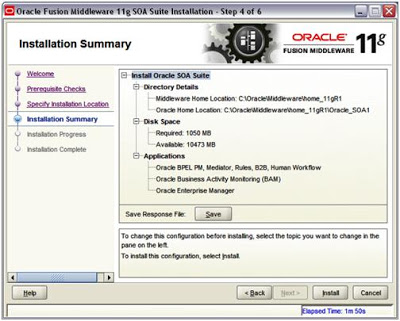
8. Review Summary.

9. Click on Install.

10.Wait for the installation to complete—it takes a few minutes. Click on Finish.

Oracle Service Bus (OSB) Installation

Once SOA is installed into Oracle Home we are ready to Install OSB on that.
Extract ofm_osb_generic_11.1.1.5.0_disk1_1of1.zip at C:\OSB (this can be any path where you want to extract these zip files)

1. In a command window, enter:
C:\OSB\Disk1\Setup –jreLoc C:\Oracle\Middleware\home_11gR1\jdk160_11

2. When the install wizard Welcome screen comes up, click on Next.

3. Select “Skip Software Updates” and click “Next”

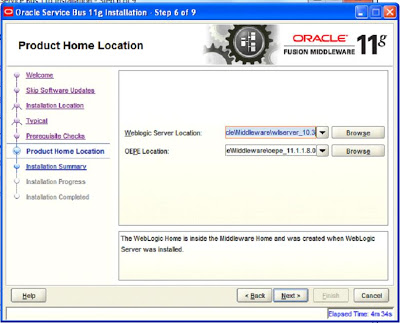
4. Leave default values for location:

5. Select “Typical” Installation and click Next:

6. Pre-requisites will be checked - click Next once done:

7. Accept default locations and click Next:

8. Review the summary and click Install

9. When it reaches to 100% - click Next and Finish

Domain Creation

This step describes detail for configuring the WebLogic server domain for the SOA server.

1. In a command window, enter:
C: /Oracle/Middleware/home_11gR1/Oracle_SOA1/common/bin
Config.cmd

2. When the configuration wizard's Welcome screen comes up, select Create a new WebLogic domain, and then click on Next.

3. Select Generate a domain and select SOA Suite, Enterprise Manager, and Business Activity Monitoring. Dependent products are selected automatically.

4. Click on Next.

5. Enter the domain name: domain1. or any other desired domain name

6. Click on Next.

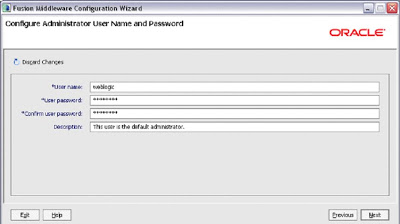
7. Enter the user name as weblogic and a password. The password welcome1 is assumed in this document but you should choose your own secure password and remember it for later in the document when the password is referenced.

8. Click on Next.

9. Select the Sun SDK 1.6_11 and leave Development Mode checked.

10. Click on Next.

11. On the Configure JDBC Component Schema screen, you select the components that you want to change, and then enter the property value for those components. First, select all of the components and enter welcome1 for the password in the Schema Password field.

12. With all of the checkboxes selected, enter the Service, Host, and Port values.

13. Now, look at the table. Review the Schema Owner column and confirm that the values are the same as what you configured in the Configure Schema section when you ran the RCU. Go back and review the screenshots in that section of this document for the schema owners if you do not remember them.

14. Complete the following if the schema owners need to be updated:

  1. Deselect all the component checkboxes.
  2. Select BAM Schema only.
  3. Enter the Schema Owner for BAM.
  4. Next, deselect BAM Schema and select the next one.
  5. Enter the schema owners one-by-one.
  6. Continue until all schema owners are entered.

15. Click on Next.

16. The data source connections are all tested.

17. If all are successful, click on Next, otherwise click on Previous and correct any errors.

18. You will now see options for optional configurations. Select Administration Server, Managed Servers Cluster and Machines and Deployments and Services.

19. Next screen is for configuring managed servers. Select bam_server1 and click Delete, select soa_server1 and click Delete. Then Click Next.

20. And then again Next, On the Configure Machine screen Click next.

21. On the next screen Move AdminServer to the right and click Next.

22. For Target Services to Cluster or Servers,If not already done, select AdminServer on the left and click Select All on the right. Click Next.

23. You reach the Configuration Summary screen.
Click on Create.

24. Wait for the creation to finish it takes few minutes. Click on Done.

This ends the process of Oracle Fussion Middleware (SOA 11g) installation.

Now you can access Oracle Enterprise Manager on http://:7001/em

Weblogic Server Console on http://:7001/console


Thursday, October 22, 2015

Oracle Service Bus Interview Questions with Answers - Part IV

Part - IV

1. What is Message Flow?

Ans: Message Flow is an OSB component which is part of proxy service. We define our business logic in message flow.

2. Can we delete Start Node in Message flow?

Ans: Start Node comes by default in message flow once we create a proxy service. Every message flow should always have a start node and we can't delete the start node in message flow.

3. Can we add multiple pipeline pairs in one message flow?

Ans: Yes, we can add more than one pipeline pair in one message flow.

4. Can we directly add actions under request or response pipeline?

Ans: No, we can't add actions directly under request or response pipeline, we need to add stage node in request or response pipeline and inside that stage, we can add all required actions.

5. Can we have more than one route node in message flow?

Ans: No, we can't add more than one route node in message flow.

6. Which node you will use when you need to route the message based on content?

Ans: We will use Conditional Branch to route the message to different business services based upon content, this is also called content based routing.

7. Which node you will use to route the message based upon operations?

Ans: We will use operation Branch to route the message to different business services based upon operation.

8. Can we delete the default branch in conditional or operational branch?

Ans: No, we can't delete the default branch in conditional or operational branch.

9. Can we add more than one route in one conditional or operation branch?

Ans: Yes, if we need more than one branch then we add one route node in each branch as each branch will be independent and only one branch will execute at one time.

10. Can we add stage node under route node?

Ans: No, we can't add stage node under route node. Stage node can be added only under request and response pipeline or in error handlers.

11. What is Dynamic Routing action?

Ans: This action is used when we need to route the message to business service dynamically that means at design time we don't know to which business service we have to route the message and that is determined at run time.

12. Which action we use to throw fault/error in message flow?

Ans: We use "raise-error" action to throw business fault in message flow.

13. What is reply action?

Ans: It specify that immediate reply is sent to invoker.

14. What actions we use for OSB reporting?

Ans: We use Alert, Log and Report for OSB reporting.

15. Can we change the file name in message flow at runtime?

Ans: Yes, we can change file name at runtime using Transport Header action.

16. Can we change the endpoint URI of the external service that we invoke using business service?

Ans: Yes, we can do it by using routing option action.

Part - I | Part - II | Part - III


Oracle Service Bus Interview Questions with Answers - Part III

Part - III

1. What is Service Result caching in OSB?

Ans: Service Result Caching is one of the options that you can use when you want to improve Oracle Service Bus performance. Service Result caching is used when we have business service which connects to external service which returns somewhat static response. So by using Service Result Caching we don’t hit external service for same request instead it will take the response from cache which improve the OSB performance

2. How to perform Service Callout in OSB?

Ans: We use Service Callout option inside Oracle Service Bus to call any service inside message flow to get the required data.

3. When we invoke proxy 2 from proxy 1 then which protocol we need use?

Ans: When there is internal proxy call in OSB then we use "local" transport instead of HTTP.

4. What is content based routing in OSB?

Ans: When we route the request message to different business services based on request message content, that is called content based routing.

5. What are different options available in OSB to read flat file?

Ans: We can read flat file in two different ways.

  • Using Message Format Language (MFL): we can MFL in OSB to read flat files.
  • File Adapter: Create file adapter which read flat file in Jdeveloper, copy JCA, WSDL & XSD file of file adapter in OSB and create proxy service which will read that flat file.

6. What is SLA alert in OSB?

Ans: A service-level agreement (SLA) is a contract between a service provider and a service consumer. In OSB monitoring framework we have SLA alerts which come into picture when there is violation of service level agreements.

7. How to move large file without reading it in OSB?

Ans: In Oracle SOA Suite we use "Move" opeartion to move large files from one location to another. But in Oracle Service Bus we don’t have that option available. But we can use Content Streaming option available for file protocol in OSB to move large files.

8. By how many ways we can do OSB development?

Ans: We can do development in OSB by two ways. Either we can use Eclipse which is IDE tool for OSB or we can use SB console for the development.

9. Will you prefer Eclipse or SB console for OSB development?

Ans: It is simple to work with SB console as compared to eclipse, so during initial phase we can opt for SB console and later go for eclipse. When we work at enterprise level, Eclipse is always recommended.

10. Do we need to create a session when we develop projects in Eclipse?

Ans: No, we need not to create a session when we develop projects in Eclipse, session will only come into picture when we deploy the project to server from eclipse.

11. Can multiple users work on SB console at one time?

Ans: Yes, multiple users with different user roles can work on SB console at same time as session will be created for each users individually.

12. Can we test the proxy service from Eclipse?

Ans: Yes, we can test the proxy service from Eclipse, for that we need to right click on the proxy service and then click on Run As and run it on server.

13.Can we create Xquery transformation in design mode in SB Console?

Ans: No, we have to write Xquery in source mode. We can create Xquery transformation in Eclipse.

14. Do we have the option to test the Xquery Transformation?

Ans: Yes, we can test the Xquery transformation.

15. Can we use XSLT file in OSB?

Ans: Yes, OSB support both Xquery and XSLT.

Part - I | Part - II | Part - IV


Oracle Service Bus Interview Questions with Answers - Part II

Part - II

1. What is throttling in OSB?

Ans: Throttling means we want to process certain messages in one time, then we need to set some parameters in OSB to do the required task.

2. To transform from binary to XML or XML to binary format what we will use in OSB?

Ans: We use Message Format Language (MFL).

A Message Format Language (MFL) document is a specialized XML document used to describe the layout of binary data. It is an Oracle proprietary language used to define rules to transform formatted binary data into XML data. An MFL document conforms to the mfl.dtd, which includes elements and attributes used to describe each field of data, as well as groupings of fields (groups), repetition, and aggregation.

When you create a business services or proxy services of Messaging Service type, you can select MFL types as the request message type or the response message type of the service

3. Can we use MDS in OSB?

Ans: No, Oracle Service Bus does not support MDS.

4. Can we use DVM’s in Oracle Service Bus?

Ans: No, we can’t use DVM’s in Oracle Service Bus.

5. How Security works in OSB?

Ans: Oracle Service Bus leverages Weblogic Security Framework.

6. Can we use OWSM to secure OSB services?

Ans: Yes, we can use OWSM to secure OSB services.

7. To secure OSB proxy service, which OWSM policy you will use?

Ans: To secure OSB proxy service, we use OWSM service side policy.

8. Can we invoke secure web service from OSB?

Ans: Yes, we can use OWSM client policy and invoke secure web service from OSB.

9. When we use service Account?

Ans: We use Service Account when we are invoking a service which required static authentication.

10. Can we re-use Service Account for other Business Services as well?

Ans: Yes, we can re-use the Service Account.

11. What is Transport-Level Security?

Ans: It refers to transport protocol security means secure the connection over which messages are transferred. E.g. HTTPS means HTTP over SSL.

12. What is Message-Level security?

Ans: Message level security is used when we want to protect the message exchanged between two applications.

13. What is Service pooling in OSB?

Ans: In OSB we can group together more than one service so that whenever one service goes down, request will route to next available service and end user can continue his work without any interruption.

14. How file pooling works in OSB?

Ans: There are below two ways to poll a file in OSB.

  • OSB file protocol: We can use file protocol available in proxy service to poll the file.
  • File adapter: we can create file adapter in Jdeveloper and import JCA, WSDL & XSD file of that adapter into OSB and generate proxy service from that.

15. Types of pipeline available in OSB?

Ans: We have two pipelines in OSB, Request and Response pipeline.

16. Can we invoke Restful service from OSB?

Ans: Yes, we can invoke Restful service from OSB.

17. We don’t have any DB protocol in OSB then how to read/write data from database using OSB?

Ans: We can use database adapter to read/write data from database. We can create database adapter in Jdeveloper, import adapter JCA,WSDL & XSD files to OSB and generate proxy or business service as per our requirement.

18. How to perform file listing in OSB?

Ans: To perform file listing in OSB, you need to create file adapter with file listing operation in Jdeveloper and use that only.

Part - I | Part - III | Part - IV


Oracle Service Bus Interview Questions with Answers - Part I

Part - I

1. To connect to source system which service we will use?

Ans: We will use Proxy service to connect to Source system.

2. To connect to target system which service we will use?

Ans: We will use Business service to connect to target system.

3. What is Business Service?

Ans: It is a service in OSB which is used to connect to target system.

4. What is Message Flow?

Ans: Message flow is there in proxy service, we do all types of transformation, routing and other processing message flow only.

5. Do we have global variable in OSB (Can we access variable which is defined in proxy service message flow from other proxy service message flow)?

Ans: No, we can't access variable in proxy service message flow from other proxy service message flow.

6. Can we use direct bindings to call SOA composites?

Ans: Yes, we can direct binding-bindings to call SOA composites along with SOAP bindings.

7. Where the file will go if there is any error while polling the file?

Ans: During configuring file or ftp protocol in OSB, we need to specify error directory, so you can see file to that directory if file polling failed.

8. Why we use Split-Joins in OSB?

Ans: In short - For parallel processing. (Split-Joins let you send message invocations in parallel (in addition to sequentially) and to aggregate the responses.)

Oracle Service Bus's Split-Join feature lets you split a service payload, such as an order, into individual messages for concurrent processing. Concurrent processing, as opposed to sequential processing, greatly improves service performance. Split-Join achieves this task by splitting an input message payload into sub messages (split), routing them concurrently to their destinations, and aggregating the responses into one overall return message (join). This process of payload splitting and response aggregation is called a Split-Join pattern.

9. Types of Split-Joins?

Ans: Static and dynamic.

  • Static Spilt-Join: The static Split-Join branches from the main execution thread of an OSB message flow by splitting a payload into a fixed number of new branches according to the configuration of the Split-Join. At design time you determine the number and variety of services to be invoked.
  • Dynamic Spilt-Join: The dynamic Split-Join branches from the main execution thread of an OSB message flow by dynamically creating new branches according to the contents of the incoming payload. The dynamic Split-Join uses conditional logic to determine the number of branches to create. All requests are handled simultaneously, and the responses are aggregated into a single reply.

10. How to call Java code from OSB?

Ans: By using Java callout activity.

11. Can we use more than one route node in message flow?

Ans: No, we can't we use more than one route node in proxy service message flow.

12. When we call asynchronous service from OSB then how to get response back from that asynchronous service to OSB?

Ans: Design the proxy service which in turn calls business service which in turn calls asynchronous service. In the message flow of this proxy change the message header to below.

You need to specify ReplyTo value so that asynchronous service response came to CallSyncCompositeProxy proxy service.

Remember ReplyTo address refers to CallSyncCompositeProxy endpoints.

Part - II | Part - III | Part - IV


Thursday, July 16, 2015

Oracle ADF Architecture Overview

Overview

In modern application development, the framework plays an important role--without the support of a mature framework, rapid application development is quite impossible. Oracle has developed an innovative, mature and stable Java EE development framework called Oracle Application Development Framework (ADF). The ADF framework is part of Oracle's award-winning JDeveloper 11g development environment. Oracle ADF provides infrastructure support as part of the framework, so that developers can concentrate on the actual application development. The integrated tool is very useful for rapid application development. Let's discuss the ADF framework and its architecture.

Introduction

In web application development, MVC (Model-view-controller) design pattern is very popular. Oracle ADF also implements the MVC design pattern. The ADF framework provides all the layers of this popular architecture (MVC) and provides solutions in the following areas:

  • Object-Relational Mapping (ORM)
  • Data persistence layer
  • Reusable controller layer
  • Rich user interface based on JSF technology
  • Data binding mechanism with the UI layer
  • Security features
As a result, the coverage of this tool is very useful in the creation of a composite and efficient web application that goes beyond normal MVC framework.

Why Oracle ADF?

As we know. J2EE is a set of specifications for building robust, scalable, secured multi tier applications. But J2EE does not provide any set of tools to make the application itself. So the biggest challenge for making J2EE applications is the selection of tools. There are many different J2EE compliant tools in the marketplace but the selection of the best tool is one of the major criteria behind successful J2EE application development.

So we need a framework that provides an abstract layer on top of the complex J2EE platform. This is the role of the Oracle Application Development (ADF) framework as it provides the infrastructure and design implementation support as part of the framework. Oracle ADF also provides a visual and declarative development approach to support rapid development.

Oracle ADF Key Features

The following are the key features provided by the ADF framework.

  • Integrated development environment: Oracle ADF comes bundled with JDeveloper. So JDeveloper works as a perfect tool for ADF application development using visual and declarative approach. It minimizes the development effort.
  • Vendor neutral: Oracle ADF is vendor neutral. The Oracle ADF runtime can be used with any J2EE compliant application server.
  • Technology support: Oracle ADF provides different layers for J2EE application development. The layers can be developed using different technologies. So the Oracle ADF is also technology neutral.
  • Composite end to end solution: Oracle ADF provides support for complete end to end development of J2EE application. So the developers can completely concentrate on the development work instead of the tool or technology selection.

Oracle ADF Architecture

We have already discussed that Oracle ADF follows the MVC design pattern. A typical MVC application contains the following three layers.

  • Model layer that holds the business logic.
  • View layer that handles the user interface.
  • Controller layer that manages the interaction between Model and View layers.
All the components of the application are loosely coupled. This helps with the maintenance of the application and increases the reusability. So the architecture can be defined as Service Oriented Architecture (SOA).

Oracle ADF has four layers in its MVC implementation. It has separate model layer and business service layer to implement service oriented architecture. So we can define the Oracle ADF architecture as MVC model with a business service layer. Here are the four layers of ADF architecture:

  • Business Service layer: This layer handles data from various sources and business logic.
  • Model layer: This layer does not handle business logic directly; rather it provides an abstract layer on top of the business service layer. This particular design pattern helps the view and controller to work with various business service implementations.
  • Controller layer: It controls the web application flow.
  • View layer: It provides the user interface.
The figure below represents the core architecture of the Oracle ADF framework. Different layers and their interaction are shown as an example. The components in different layers can be changed per the application requirement.

As we have seen in different layers, the choice of technology is very flexible. The view layer supports desktop, mobile and web interfaces. The controller and model layer comes under the ADF framework so there is not much change. The business service layer can be anything such as Java, EJB, Web, Portlet, etc. And the same flexibility is there for data layers. The application can interact with RDBMS, web service, legacy system, etc. The flexibility of Oracle ADF framework makes is very popular in the Java EE application development domain.

Now let us discuss a bit of the details about the different layers shown in the diagram.

Business Service Layer

The business service layer is the addition component in the Oracle ADF framework. ADF provides the flexibility to implement this layer using any technology, and some of those technologies are shown in the diagram. This layer manages the following tasks.

  • Interaction with data persistence layer
  • Object-relational mapping
  • Transaction management
  • Business logic execution

Model Layer

The model layer provides the single interface to connect to any business service. This model layer in the ADF architecture does not handle business logics itself, rather provides the abstraction on top of the business services. So the flexibility of implementing any business service is a great advantage of the ADF framework. The model layer in ADF is also called 'ADF binding'. It has following to components.

  • Data controls: It provides abstraction on top of business service layers
  • Data bindings: It exposes data control methods to the UI layer.

Controller Layer

The controller layer is responsible for handling application flow and user input. The navigation rules are defined on a diagram to manage application flow. Here are the two types of controllers used in web-based applications.

  • JSF controller
  • ADF controller
Note: ADF controller extends the functionality of JSF controllers.

View Layer

The view layer is the front end of any application. The front end layer can be a desktop application, mobile application or web-based application. The multichannel support of the Oracle ADF framework is very useful for developing any type of application. Oracle ADF provides more than 150 Ajax based, ready-made JSF components for creating dynamic web interfaces.

Benefits of the Oracle ADF Framework

The following are some of the benefits of Oracle ADF framework:

  • Support for visual and declarative view and controller development
  • Various options to construct business service layers
  • End to end solution for all the Java EE layers
  • Technology and platform independence
  • Meta data driven development
  • Support for reusability and flexibility

Conclusion

There are different vendors who provide development tools, frameworks based on Java EE specifications. So for developing any Java EE application, developers need to know these tools and their usage. But most of these tools do not support all the layers of Java EE application development. As a result, developers are sometimes a bit confused when choosing tools or frameworks. Oracle ADF provides a complete development environment, infrastructure code, design patterns and ease of development. So the combination of Oracle ADF framework and visual development environment is very popular in the Java EE development community.


Saturday, June 20, 2015

Business Rules in Oracle SOA Suite 11g

At runtime, there may be many potential paths through a BPEL process, controlled by conditional statements such as switch or while activities. Typically, the business rules that govern which path to take at any given point are written as XPath expressions embedded within the appropriate activity.

Although this is an acceptable approach, we often find that while the process itself may be relatively static, the business rules embedded within the activities may change on a more frequent basis. This will require us to update the BPEL process and redeploy it, even though the process flow itself hasn't changed.

In addition, by embedding the rule directly within the decision point, we often end up having to reimplement the same rule every time it is used, either within the same process or across multiple processes. Apart from being inefficient, this can lead to inconsistent implementations of the rules, as well as requiring us to update the rules in multiple places every time it changes.

The Oracle Business Rules engine that comes as part of the SOA Suite provides a declarative mechanism for defining business rules externally to our application. This not only ensures that each rule is used in a consistent fashion, but in addition, it makes it simpler and quicker to modify. We only have to modify a rule once and can do this with almost immediate effect, thus increasing the agility of our solution.

For those of you familiar with 10gR3, you will notice that JDeveloper comes with a new rules editor which is a lot more intuitive and simpler to use than the old browser-based editor. In addition, 11gR1 introduces decision tables, which provide a spreadsheet-like format for defining rules. While still very much a developer-oriented tool, these improvements make the tool a lot friendlier for business analysts, allowing them to better understand the rules that have been written as well as make simple changes.

In this post, we shall look at the new rules editor and how we can use it to define a decisions service to automate the approval of leave requests. Then, once we've done this, we'll see how to invoke the rule from the leave approval BPEL process. We will first implement these as a standard set of rules and then examine how we can simplify these rules by using a decision table.

Business rule concepts

Before we implement our first rule, let's briefly introduce the key components which make up a business rule. These are:

  • Facts: Represent the data or business objects that rules are applied to.
  • Rules: A rule consists of two parts, namely, an IF part that consists of one or more tests to be applied to a fact(s), and a THEN part that lists the actions to be carried out, should the test evaluate to true.
  • Rule Set: As the name implies, it is just a set of one or more related rules that are designed to work together.
  • Dictionary: A dictionary is the container of all components that make up a business rule. It holds all the Facts, Rule Sets, and Rules for a business rule.

In addition, a dictionary may also contain decision tables, functions, variables, and constraints. We will introduce these in more detail later in this article.

To execute a business rule, you assert (submit) one or more facts to the rules engine. It will apply the rules to the facts, that is, each fact will be tested against the IF part of the rule, and if it evaluates to true, then it will perform the specified actions for that fact. This may result in the creation of new facts or the modification of existing facts (which may result in further rule evaluation).

XML facts

The rule engine supports four types of facts: Java Facts, XML Facts, RL Facts, and ADF Facts. The type of fact that you want to use typically depends on the context in which you will be using the rules engine.

For example, if you are calling the rule engine from Java, then you would work with Java Facts as this provides a more integrated way of combining the two components. As we are using the rule engine within a composite, it makes sense to use XML facts. The rule editor uses XML schemas to generate JAXB 2.0 classes, which are then imported to implement the corresponding XML facts. Using JAXB, particularly when used in conjunction with BPEL, places a number of constraints on how we define our XML schemas, including:

  • Within BPEL, you can only define variables based on globally defined elements. Thus all input and output facts passed to the decision service must be defined as global elements within our XML schemas.
  • When defining the input and output facts for any complexType (for example, tLeaveRequest), there can only be one global element of that type (for example, leaveRequest).
  • The element naming convention for JAXB means that elements or types with underscores in their names can cause compilation errors.

Decision services

To invoke a business rule within a composite, we need to go through a number of steps. First, we must create a session with the rules engine, then we can assert one or more facts, before executing the ruleset and finally we can retrieve the results.

We do this via a decision service (or function). This is essentially a web-service wrapper around a rules dictionary, which takes care of managing the session with the rules engine as well as governing which ruleset we wish to apply.

The wrapper allows a composite to assert one or more facts, execute a ruleset(s) against the asserted facts, retrieve the results, and then reset the session. This can be done within a single invocation of an operation or over multiple operations.

Leave approval business rule

For our first rule, we are going to build on Adding in Human Workflow. It's a simple process requiring every leave request to go to an individual's manager for approval. However, what we would like is a rule that automatically approves a request as long as it meets certain company guidelines.

To begin with, we will write a simple rule to automatically approve a leave request that is of the type Vacation and only for one day's duration. This is a pretty trivial example, but once we've done this, we will look at how to extend this rule to handle more complex examples.

Creating a decision service

Within JDeveloper, open up your LeaveApproval application. Open up the composite.xml file for the application and then from the Component Palette, drag-and-drop a Business Rule onto the composite, as shown in the following screenshot:

This will launch the Create Business Rules dialog, as shown in the following screenshot:

The first step is to give our dictionary a name, such as LeaveApprovalRules, and a corresponding <>bPackage name.

In addition, we need to specify the Input and Output facts that we will pass to our decision service. For our purpose, we will pass in a single leave request. The rule engine will then apply the rules that we define and update the status of the leave request to either Approved or Manual (to indicate the request needs to be manually approved).

So we need to define a single input fact and output fact, both of type leaveRequest. To do this, click on the plus symbol (marked in the preceding screenshot), and select Input.

This will bring up the standard Type Chooser window; browse the LeaveRequest.xsd and select leaveRequest. Do the same again to specify an Output fact.

Next, click the Advanced tab. Here we can see that JDeveloper has given the default name LeaveApprovalRules_DecisionService_1 to our decision service. Give it a more meaningful name such as LeaveApprovalDecisonService.

Now click OK. JDeveloper will inform you that it is creating the business rule dictionary for LeaveApprovalRules. Once completed, your composite should now look as shown in the following screenshot:

We are now ready to implement our business rules. Double-click on the LeaveApprovalRules component, and this will launch the rules editor, which is shown in the next screenshot.

Implementing our business rules

The rules editor allows you to view/edit the various components which make up your business rules. To select a particular component, such as Facts, Functions, Globals, and so on, just click on the corresponding tab down the left-hand side.

You will see that, by default, JDeveloper has created a skeleton rules dictionary-based on the inputs we just specified.

Select the Facts tab (as shown in the preceding screenshot). You will see that it contains two XML facts (TLeaveRequest and com.packtpub.schemas.leaverequest.ObjectFactory), which are based on the inputs/outputs we defined earlier as well as a set of standard Java facts, which are automatically included within a rules dictionary.

Next, select the Decision Functions tab. You will see that it contains a single decision function LeaveApprovalDecisonService (that is, the name we specified on the Advanced tab when creating our business rule).

We will introduce some of the other tabs later in this article, but for the time being, we will start by defining our first rule. By default, the rules editor will have created a single ruleset with the name Ruleset_1. Click on the Ruleset_1 tab to open up the ruleset within the editor.

Expand the ruleset to show its details by clicking on the plus symbol (circled in the following screenshot). We can see that the ruleset has three properties: Name, Description, and Effective Date.

The Effective Date enables us to specify a period in time for which the ruleset will be applied, allowing you to define multiple versions of the same ruleset. For example, a current ruleset and a future version that we wish to come into effect at a defined time in the future.

Rename the ruleset to something more meaningful, for example, Employee Leave Approval Policy; add a description if you want and ensure that Effective Date is set to Always Valid.

Adding a rule to our ruleset

To add a rule, click the green plus symbol on the top-right-hand corner, and select Create Rule, as shown in the following screenshot (alternatively click on the Create Rule button, circled in the following screenshot).

This will add a rule to our ruleset with the default name Rule_1, as shown in the following screenshot. Here, we can see that a rule consists of two parts, an IF part, which consists of one or more tests to be applied to a fact or facts, and a THEN part, which specifies the actions to be carried out, should the test evaluate to true.

To give the rule a more meaningful name, simply click on the name and enter a new name (for example, One Day Vacation). By clicking on the element, you can also add a description for the rule.

Creating the IF clause

For our leave approval rule, we need to define two tests, one to check that the request is only for a day in duration, which we can do by checking that the start date equals the end date, and the second to check that the request is of type Vacation.

To define the first test, click on <insert test>. This will add the line = = under the IF statement where we can define the test condition.

Click on the first . This will display a drop-down list listing the valid facts and their attributes that we can test. From here, we can select the value to be tested, for example, TLeaveRequest.startDate in our case.

Next from the operator drop-down list, select the test to be applied to the first operand (== in our case). We can either choose to compare it to a specified value or a second Operand. For our purpose, we want to check that the request.startDate equals the request.endDate, so click on the operand and select this from the drop-down list.

To create our second test, we follow pretty much the same process. This time we want to test that the operand leaveRequest.leaveType is equal to the value Vacation, so select the right-hand operator and type this in directly:

Note, the rule editor has automatically inserted an and clause between our two tests. If you click on this, you have the option of changing this to an or clause.

Creating the Then clause

Now that we have defined our test, we need to define the action to take if the test evaluates to true. Click on . This will display a drop-down list where you need to specify the Action Type you wish to carry out.

The rule editor allows us to choose from the following action types:

  • assert new: We use this to create and assert a new fact, for example, a new LeaveRequest. Once asserted, the new fact will be evaluated by the rules engine against the ruleset.
  • modify: We can use this to either assign a value to a variable or a fact attribute; in our case we want to assign a status of Approved to the requestStatus property.
  • retract: This enables you to retract any of the facts matched in the pattern (for example, TLeaveRequest) so that it will no longer be evaluated as part of the ruleset.
  • call: This allows you to call a function to perform one or more actions.

The actions assert new and retract are important when we are dealing with rulesets that deal with multiple interdependent facts, as this allows us to control which facts are being evaluated by the rule engine at any particular time.

For our purposes, we want to update the status of our leave, so select modify. Our rule should now look as shown in the following screenshot:

The next step is to specify the fact to be modified. Click on the <target> element and you will be presented with a list of facts that are within scope. In our case, this will only be the TLeaveRequest that has just been matched by the IF clause, so select this. Our rule will now appear, as shown in the following screenshot:

We now need to specify the properties we wish to modify, click on <add property> to open the Properties dialog. This will display a list of all the facts properties, allowing us to modify them as appropriate.

Select the Value cell for requestStatus. From here, you can directly enter a value, select a value from the drop-down list, or launch the expression builder. For our purposes, just enter the string Approved, as shown in the following screenshot, and then click Close.

We don't need to specify values for any of the other properties, as the rules engine will only update those properties where a new value has been specified.

This completes the definition of our first rule. The next step is to wire it into our BPEL process.